GPT Image 2.6 Price: Same $30 Token Rate, but a Low-Quality Image Costs 4.2x More
RenderHour · November 5, 2026 · 8 min read
In short
- GPT Image 2.6 kept its price per token and still made its cheapest image 4.2 times dearer. OpenAI released it in 2 versions, Flare and Sunburst, on November 4, 2026, at GPT Image 2’s rates: $5 per 1M text input tokens, $8 image input, $30 image output.
- But OpenAI’s own cost calculator gives a low-quality 1024x1024 image 823 output tokens, $0.02469, against 196 tokens and $0.00588 on GPT Image 2 and 2.5: 4.2 times more. At medium it’s 3.3 times GPT Image 2.5. From high quality up, it costs the same as GPT Image 2.5.
- RenderHour runs GPT Image 2, not 2.6, at 16.5 credits for a 2K high-quality image.
Same token price, 4.2 times the bill: that’s GPT Image 2.6 at low quality. OpenAI released GPT Image 2.6 Flare and Sunburst on November 4, 2026 at the same $30 per million output tokens as GPT Image 2. Its cost calculator, though, puts a low-quality 1024x1024 image at 823 tokens, $0.02469, against 196 tokens and $0.00588 for GPT Image 2. If your team drafts at low quality, each draft now costs 4.2 times as much. The lesson: pick a setting by its token count, not its name. RenderHour runs GPT Image 2, the version before it.
What is GPT Image 2.6?
It’s OpenAI’s newest image model, in 2 versions. OpenAI’s guide calls Sunburst the one “for detailed visual work” and Flare the one “for fast iteration”; the system card says Flare “is optimized for faster generation”. Both work on the Image API’s generation and edit endpoints only. Their model pages list Responses, Chat Completions and Batch as not supported.
New in the API: animated GIF output, SVG output, edits guided by marks you draw on the picture, and a complexity setting (low, medium or high, default high, no extra fee). Quality now runs low, medium, high, xhigh and max, 2 more steps than GPT Image 2’s low, medium and high.
How much does GPT Image 2.6 cost per image?
The rates per million tokens didn’t change. What changed is how many output tokens each quality step makes. OpenAI publishes the formula in the cost calculator of its image guide: GPT Image 2.6 uses GPT Image 2.5’s token grid, then multiplies low by 4.2 and medium by 3.3. High, xhigh and max aren’t multiplied.
| Quality | GPT Image 2 | GPT Image 2.5 | GPT Image 2.6 |
|---|---|---|---|
| low | 196 tokens, $0.00588 | 196 tokens, $0.00588 | 823 tokens, $0.02469 |
| medium | 1,756 tokens, $0.05268 | 439 tokens, $0.01317 | 1,449 tokens, $0.04347 |
| high | 7,024 tokens, $0.21072 | 1,756 tokens, $0.05268 | 1,756 tokens, $0.05268 |
| xhigh | Not offered | 3,122 tokens, $0.09366 | 3,122 tokens, $0.09366 |
| max | Not offered | 7,024 tokens, $0.21072 | 7,024 tokens, $0.21072 |
Source: OpenAI image generation guide, “Calculating costs”, at $30 per 1M image output tokens. Output only: text and image input tokens are extra. OpenAI’s own table rounds GPT Image 2 to $0.006, $0.053 and $0.211.
- GPT Image 2, low$0.0059
- GPT Image 2.5, low$0.0059
- GPT Image 2.6, low$0.0247
Source: OpenAI: image generation guide.
The names don’t line up across versions either. GPT Image 2.6 at high quality makes the same 1,756 tokens as GPT Image 2 at medium, and 2.6 at max matches GPT Image 2 at high. So 2.6 medium ($0.04347) is cheaper than GPT Image 2 medium ($0.05268), while 2.6 low is the dearest low of the 3. Pick a setting by its token count, not its name.
What does a vertical or 4K image cost?
| Quality | 1024x1536 portrait | 2160x3840 4K portrait |
|---|---|---|
| low | 664 tokens, $0.01992 | 1,558 tokens, $0.04674 |
| medium | 1,132 tokens, $0.03396 | 2,855 tokens, $0.08565 |
| high | 1,372 tokens, $0.04116 | 3,336 tokens, $0.10008 |
| xhigh | 2,459 tokens, $0.07377 | 5,930 tokens, $0.17790 |
| max | 5,488 tokens, $0.16464 | 13,342 tokens, $0.40026 |
Source: OpenAI image generation guide, “Calculating costs”. 2160x3840 is one of the guide’s popular sizes; the largest image is 8,294,400 pixels, with no edge over 3,840.
- low$0.0199
- medium$0.0340
- high$0.0412
- xhigh$0.0738
- max$0.1646
Source: OpenAI: image generation guide.
Those are output costs. Your prompt is billed at $5 per million text tokens, and every reference photo in an edit at $8 per million image tokens. Each streamed partial image adds 100 output tokens, the guide says.
GPT Image 2.6 in 6 numbers
- 4.2x: the multiplier OpenAI’s calculator applies to GPT Image 2.6’s low-quality token count, and 3.3x at medium.
- 823: output tokens for a low-quality 1024x1024 image, against 196 on GPT Image 2.
- $0.00: the change in price per image from high quality up, against GPT Image 2.5.
- 5: quality steps, from low to max, against 3 on GPT Image 2.
- 64: the most frames in one animated GIF, at 20 to 2,000 ms a frame (default 9 frames at 200 ms).
- 40: low-quality 1024x1024 images that $1 of output buys on GPT Image 2.6, against 170 on GPT Image 2, by our arithmetic.
Do you need GPT Image for text on a poster?
GPT Image is the model people reach for when an image has to spell words right. We can’t run 2.6 here, and GPT Image 2 costs more than our test budget allowed today, so we gave 1 poster prompt with 9 words of exact text to 3 low-cost models RenderHour runs, and counted the words each spelled right.
Prompt
A vertical promotional poster for a small bakery, cream background, a photo of a cinnamon roll on a ceramic plate in the middle, a bold dark brown headline at the top that reads exactly "FRESH AT 7 AM", below the photo smaller text that reads exactly "Cinnamon rolls $4.50", and at the bottom a rounded orange button that reads exactly "ORDER AHEAD", clean flat design, no logos
| Model | Credits | Words right | What else we saw |
|---|---|---|---|
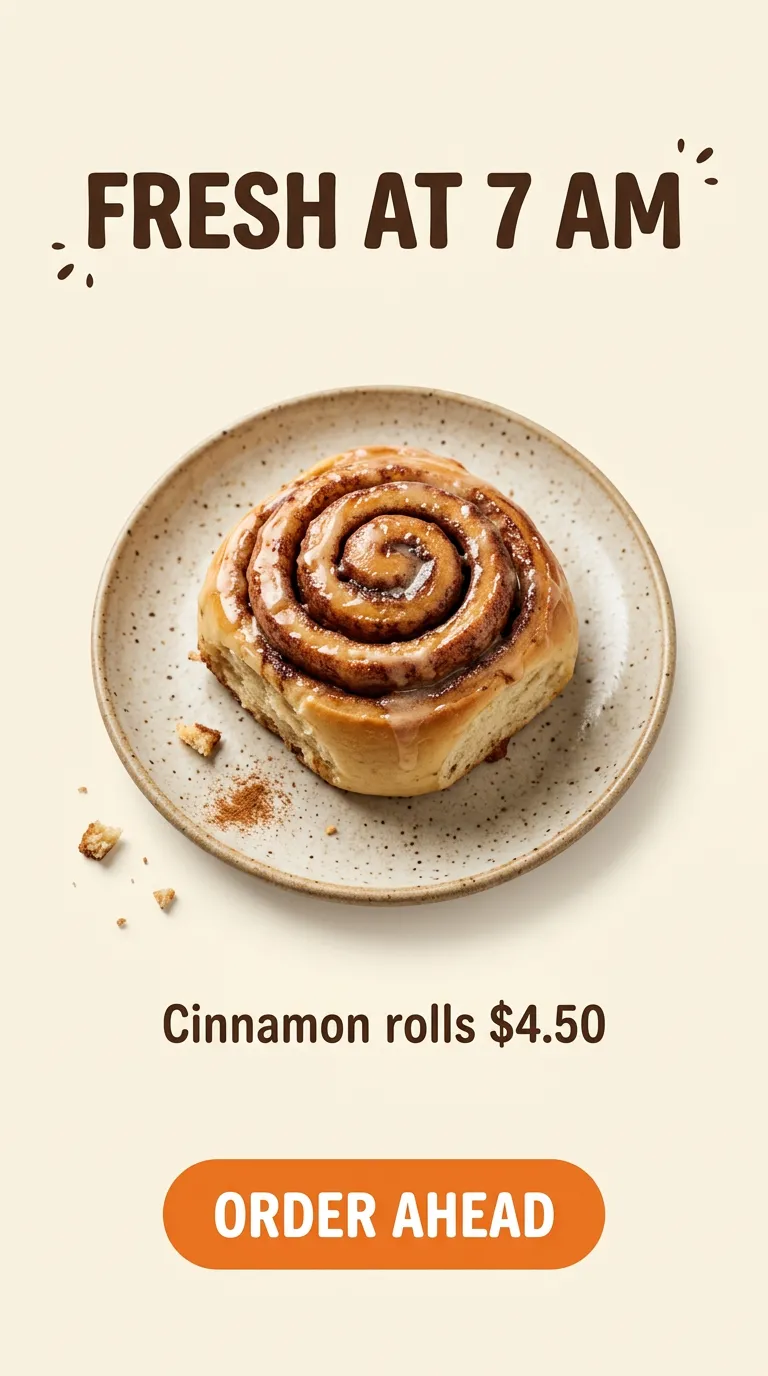
| Nano Banana 2.1 | 3 | 9 of 9 | Cream background as asked; added brown sprinkle marks around the headline and crumbs on the table |
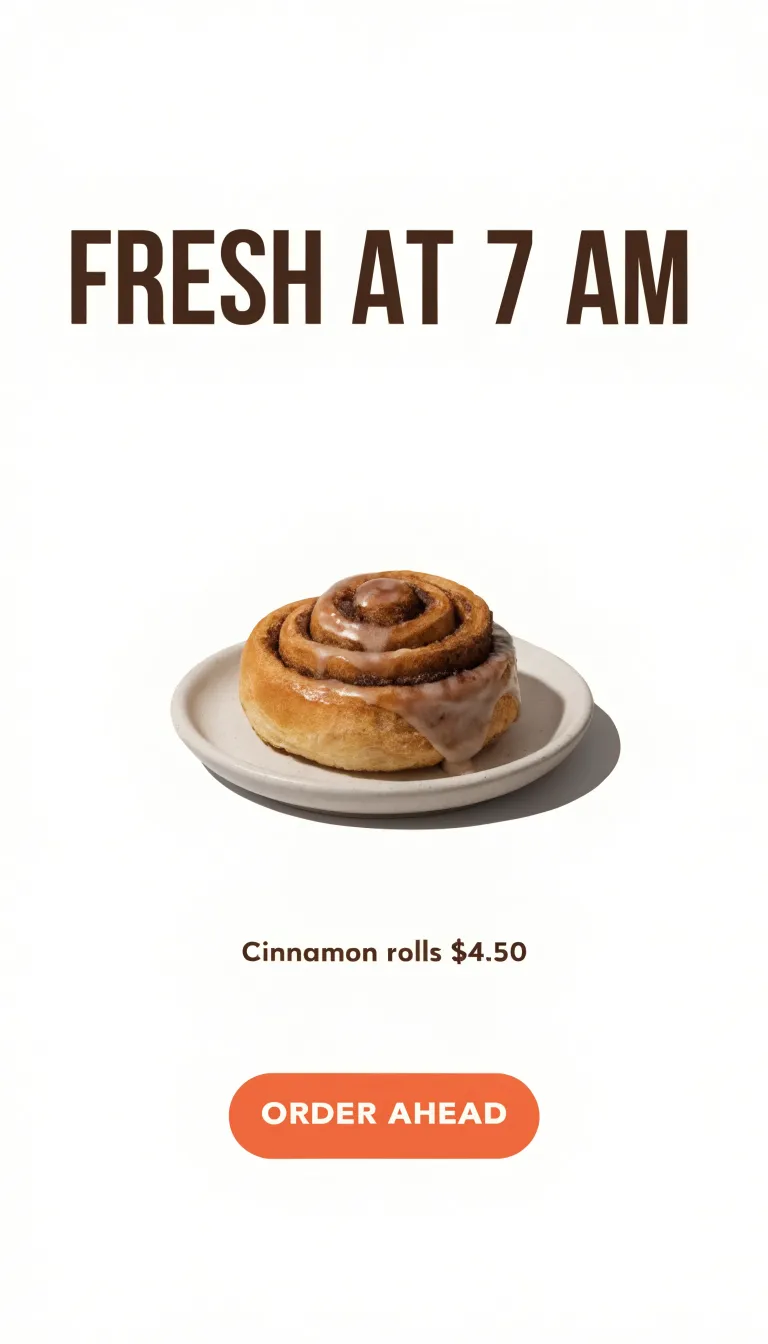
| Recraft V4.1 | 2.5 | 9 of 9 | White background, not cream; small roll and small price text with wide empty space |
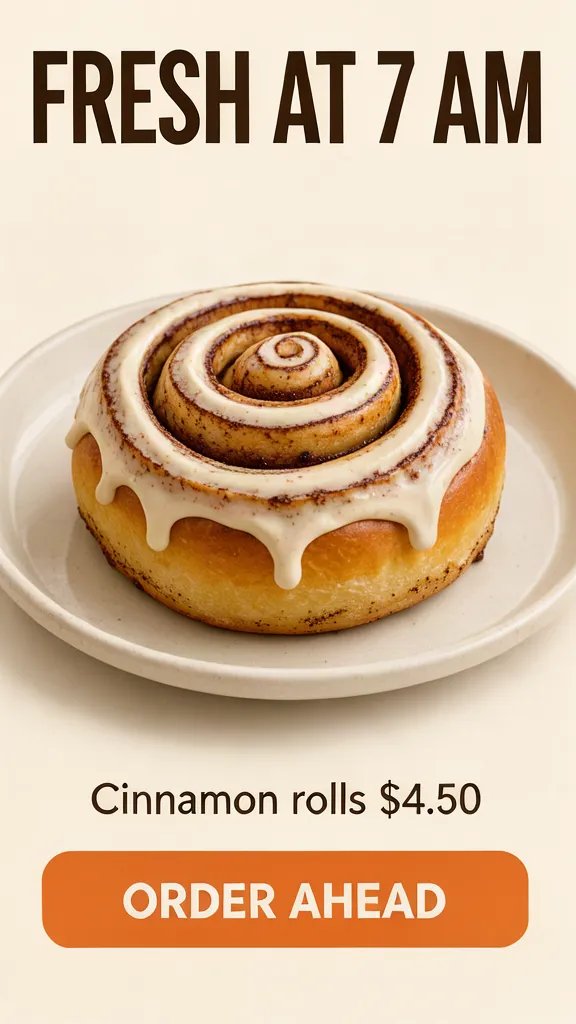
| FLUX 3 Klein | 0.65 | 9 of 9 | Cream background; the roll fills the frame and the plate is cut off at both sides; headline close to the top edge |
Source: 6.15 credits in all. Words counted by eye on the full-size files.
All 3 got every word, the time and the $4.50 price right on the first try. The differences were layout: Recraft ignored the cream background, and FLUX 3 Klein framed the roll so tight the plate runs off the edges. For a short headline and a button, a 0.65-credit model did the job. GPT Image earns its price on longer copy and dense layouts, which this small test didn’t try.
- FLUX 3 Klein, 1K0.65
- Recraft V4.1, 1K2.5
- Nano Banana 2.1, 1K3
- GPT Image 2, 2K high16.5
Source: RenderHour model list, read through the RenderHour MCP server on November 5, 2026.
What this means if you make images for social and ads
- Check your quality setting before you switch. A pipeline that drafts at low on GPT Image 2 pays 4.2 times more per draft on 2.6 at the same setting.
- Use medium on 2.6 in place of medium on 2. It makes fewer tokens (1,449 against 1,756 at 1024x1024), so it costs less.
- Final images cost the same. From high up, 2.6 and 2.5 have the same token counts, so the switch is free for finished work.
- GIFs and SVGs are API-only output, with limits. SVG needs 1 image per call and doesn’t work on the edit endpoint.
- Short text doesn’t need the top model. In our test, 3 low-cost models spelled a 9-word poster right. Keep GPT Image for long copy; see the GPT Image 2 prompt guide and how it does against Nano Banana Pro.
GPT Image, Nano Banana and FLUX on one balance
Plus billed yearly is $564 a year for 1,200 credits a month, about 3.9 cents a credit, for every image and video model, with the price shown before each run and failed runs free.
See plansQuestions
- How much does GPT Image 2.6 cost per image?
- OpenAI charges $30 per 1M image output tokens, $5 per 1M text input tokens and $8 per 1M image input tokens. Its calculator puts the output of one 1024x1024 image at $0.02469 at low quality, $0.04347 at medium, $0.05268 at high, $0.09366 at xhigh and $0.21072 at max (read November 5, 2026). Input tokens are extra.
- Is GPT Image 2.6 more expensive than GPT Image 2?
- At low quality, yes: a 1024x1024 image makes 823 output tokens on 2.6 against 196 on GPT Image 2, $0.02469 against $0.00588, 4.2 times more. At medium, 2.6 costs less than GPT Image 2 ($0.04347 against $0.05268), and from high up it matches GPT Image 2.5. The per-token rates are the same.
- What is the difference between GPT Image 2.6 Flare and Sunburst?
- OpenAI describes Flare as the version for fast iteration and Sunburst for detailed visual work. Both were released on November 4, 2026, cost the same per token, and support GIF and SVG output, markup-guided edits and the complexity setting through the Image API.
- Can GPT Image 2.6 make GIFs?
- Yes, through the Image API’s generation endpoint, not the edit endpoint. A GIF has 2 to 64 frames, 9 by default, at 20 to 2,000 milliseconds a frame, 200 by default. GIF output doesn’t support streaming or partial images.
- Where can I use GPT Image without code?
- On RenderHour (renderhour.com): open the Image page and pick GPT Image 2, 16.5 credits for a 2K high-quality image in 1:1, 3:4, 4:3, 4:5, 9:16 or 16:9, with up to 4 reference images. RenderHour doesn’t run GPT Image 2.6 yet.
- Can I make AI images with text for free?
- RenderHour gives every new account 10 free credits with no card, on its fast models. Nano Banana 2.1 is one of them, at 3 credits for a 1K image, and in our test it spelled all 9 words of a bakery poster right. GPT Image 2 needs a plan.
Try GPT Image 2 on RenderHour
10 free credits to start. You see the price in credits before you generate, and a failed run costs nothing.
Try GPT Image 2Sources
- OpenAI API changelog: GPT-Image-2.6 Sunburst and Flare, November 4, 2026
- OpenAI: image generation guide and cost calculator
- OpenAI: API pricing, image generation
- OpenAI: GPT Image 2.6 Flare model page
- OpenAI: GPT Image 2.6 Sunburst model page
- OpenAI: ChatGPT Images 2.6 system card
Prices and rankings as of November 5, 2026. They change often; the links show the current figures.